


如何防止自动启动IncrediMail
星期二, 一月 3, 2012 : 05:01 下午
问题: 如何防止与Windows自动启动IncrediMail? 这是很烦人的,当您的Windows操作系统和系统资源的程序统计. 我刚安装了它,并没有任何机会来禁用自动启动在IncrediMail设置的.
回答: IncrediMail作为最其他的方案可以广泛配置. 选项,称为 “启动上启动IncrediMail” 也可用.
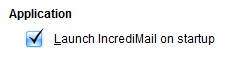
禁用此选项
IncrediMail如何禁用启动时启动?
- 如果它没有启动运行IncrediMail软件
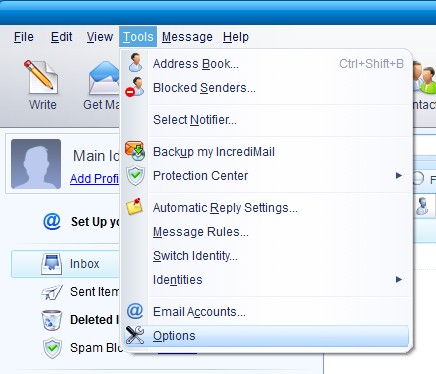
- 在顶部的文本菜单中选择 工具

- 点击 选项 项目
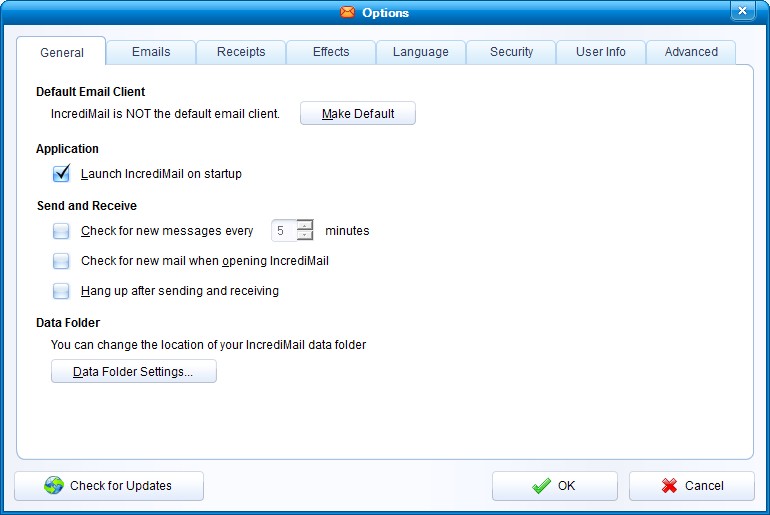
- 到 一般 “标签
- 下 应用 部分你会发现所谓的选项 “启动上启动IncrediMail”

- 禁用选项 “启动上启动IncrediMail“
- 按 确定 按钮确认更改.
IncrediMail不会打扰你了不当的启动时间.
谢谢, 这是特别有用的,因为我的方式来尝试启动,当我打开我的电脑上,所以我想他们都禁用,只把他们当需要保持我的计算机平稳运行的许多程序!